01
One playlist from your Media Manager
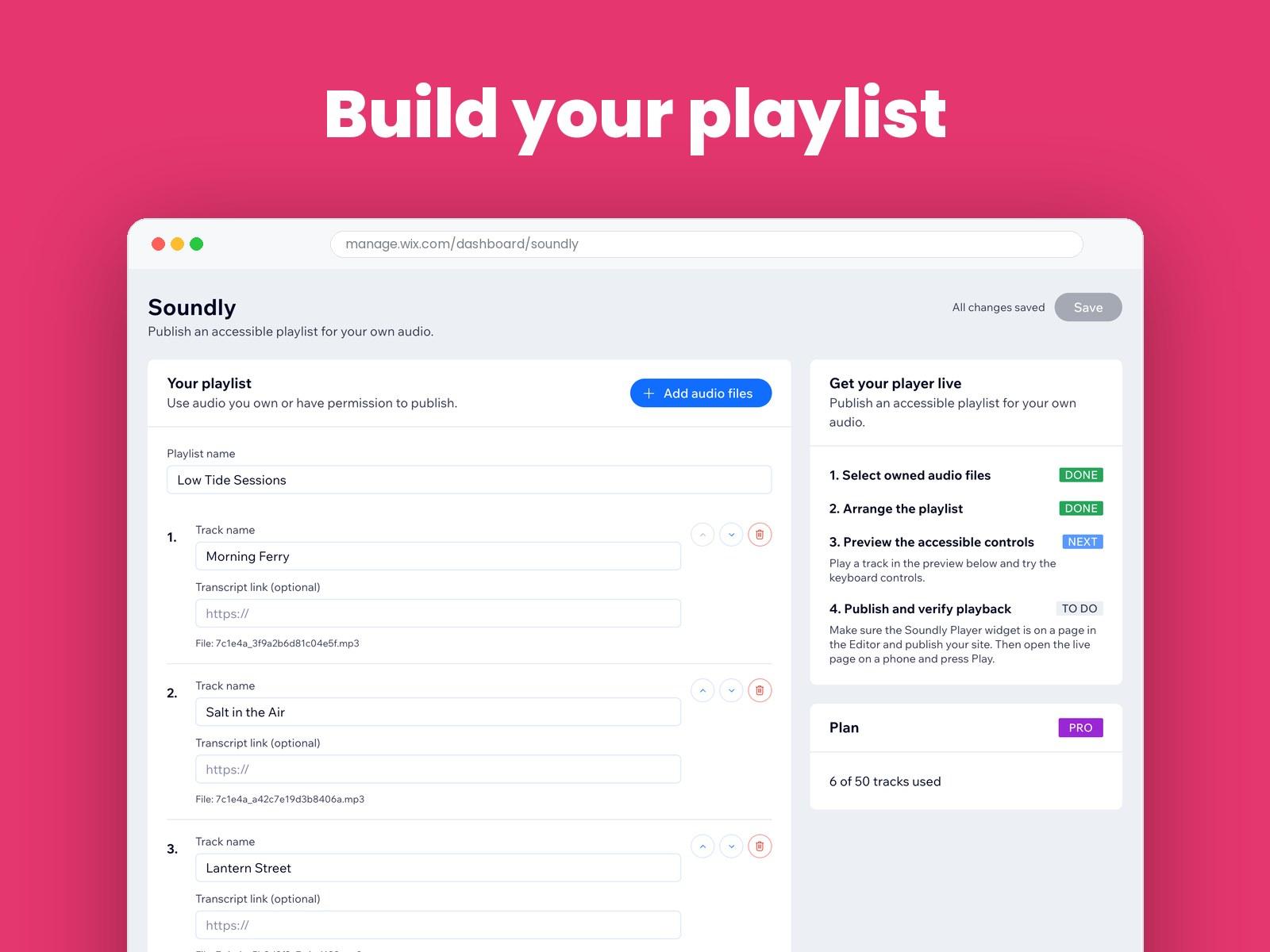
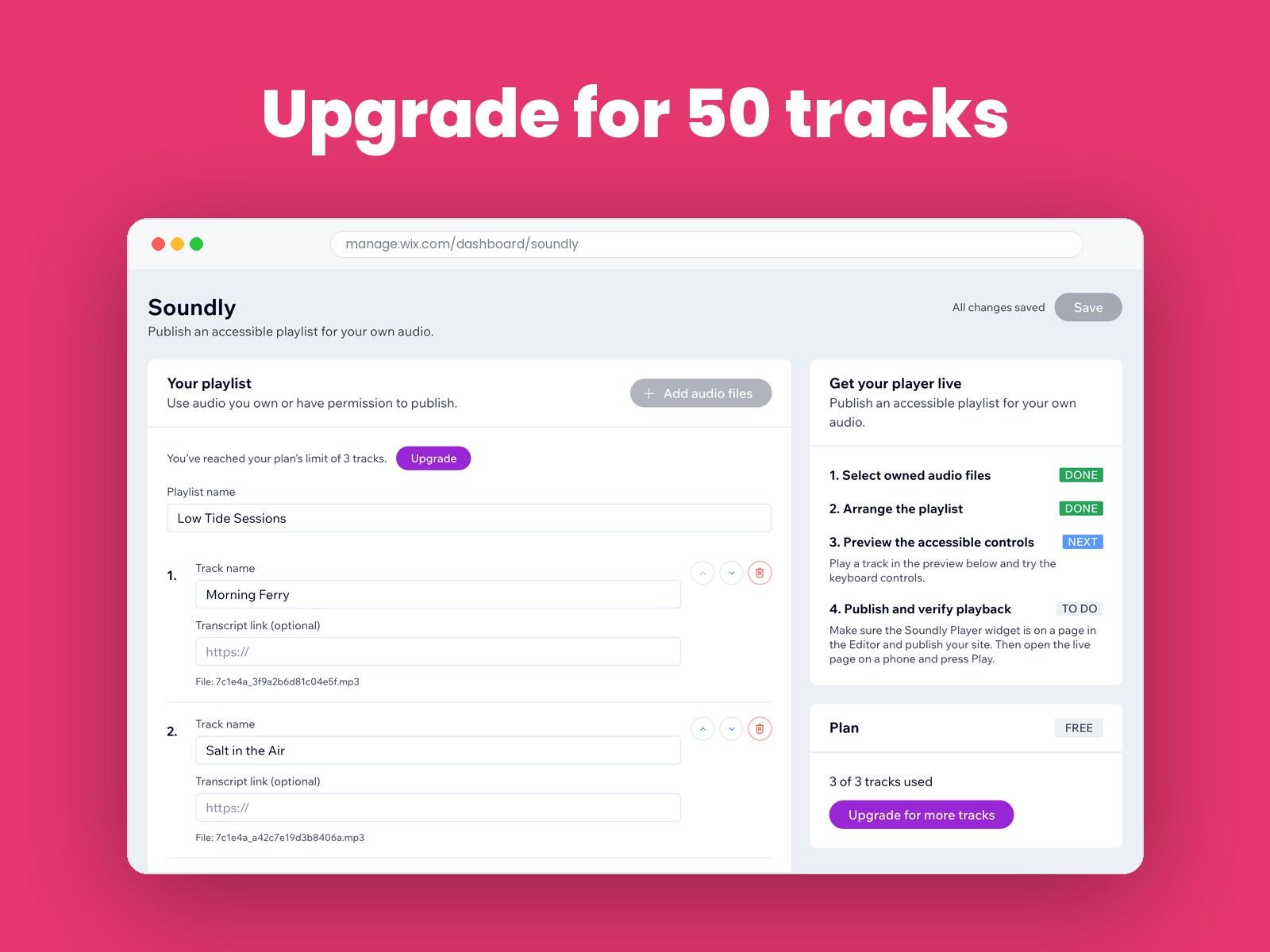
Pick audio files already in your site’s Media Manager, then name, reorder and remove tracks, preview the player live and save. Soundly never hosts your audio.
Soundly adds an audio player to your site and a dashboard where you build one playlist from audio files already in your Media Manager. Every control is labelled for screen readers and works from the keyboard, the player never autoplays, and it has large touch controls on phones. Your audio stays in your Media Manager; Soundly never hosts it.
The primary button opens the official Wix App Market listing, where you can review the current plan before installing.
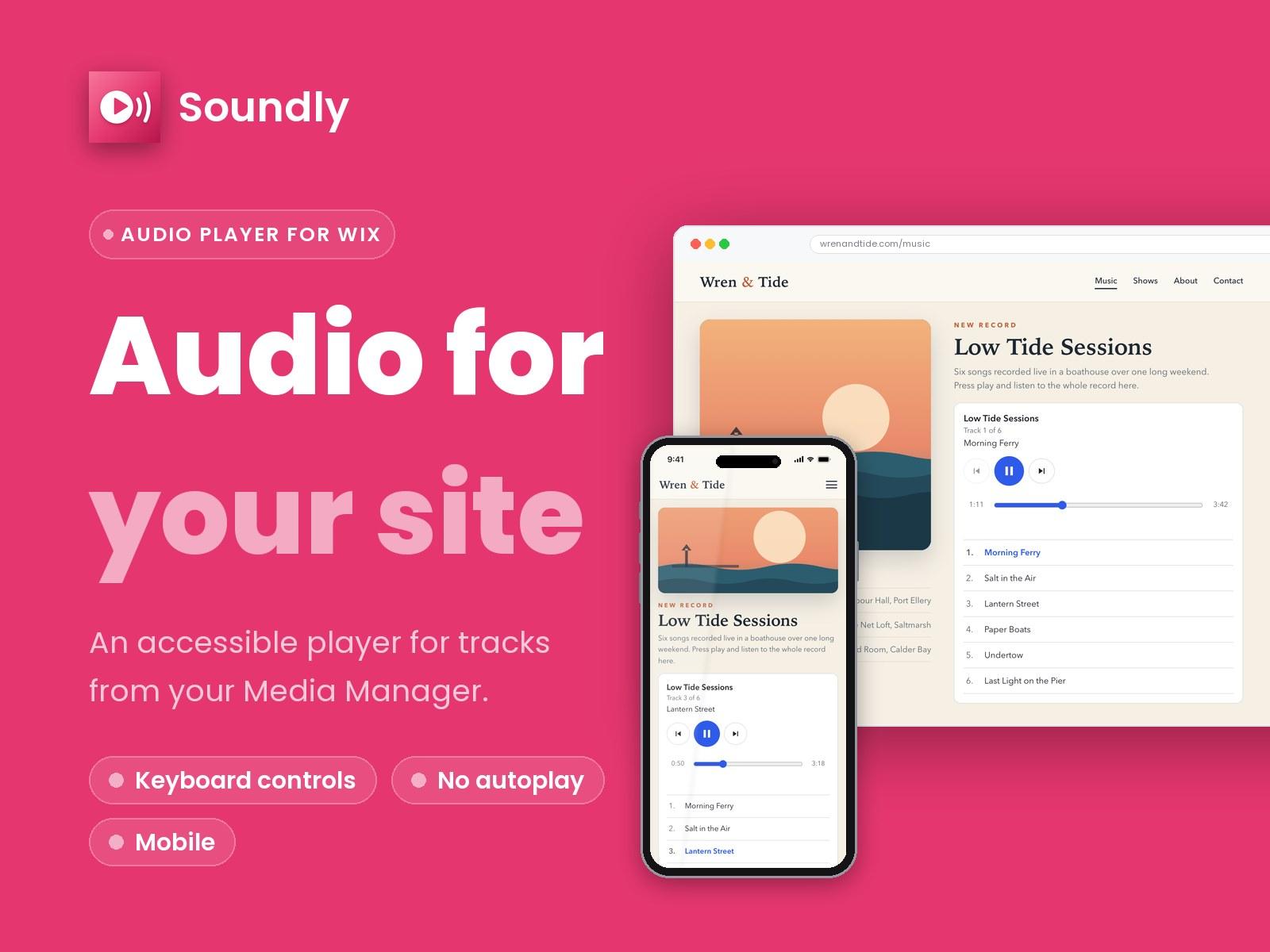
Musicians, bands, teachers and other site owners who want to share a few of their own tracks or recordings in a player visitors can use with a keyboard, a screen reader or a phone.
Free plan available. Free includes up to 3 tracks. Pro is $5.99/month, or $4.97/month billed yearly, and includes up to 50 tracks.
A Wix site with your audio files in its Media Manager. Soundly plays files from your own Media Manager only.
Audio Player | Soundly is designed around a clear outcome, with the controls needed to make it fit your Wix site.
Pick audio files already in your site’s Media Manager, then name, reorder and remove tracks, preview the player live and save. Soundly never hosts your audio.
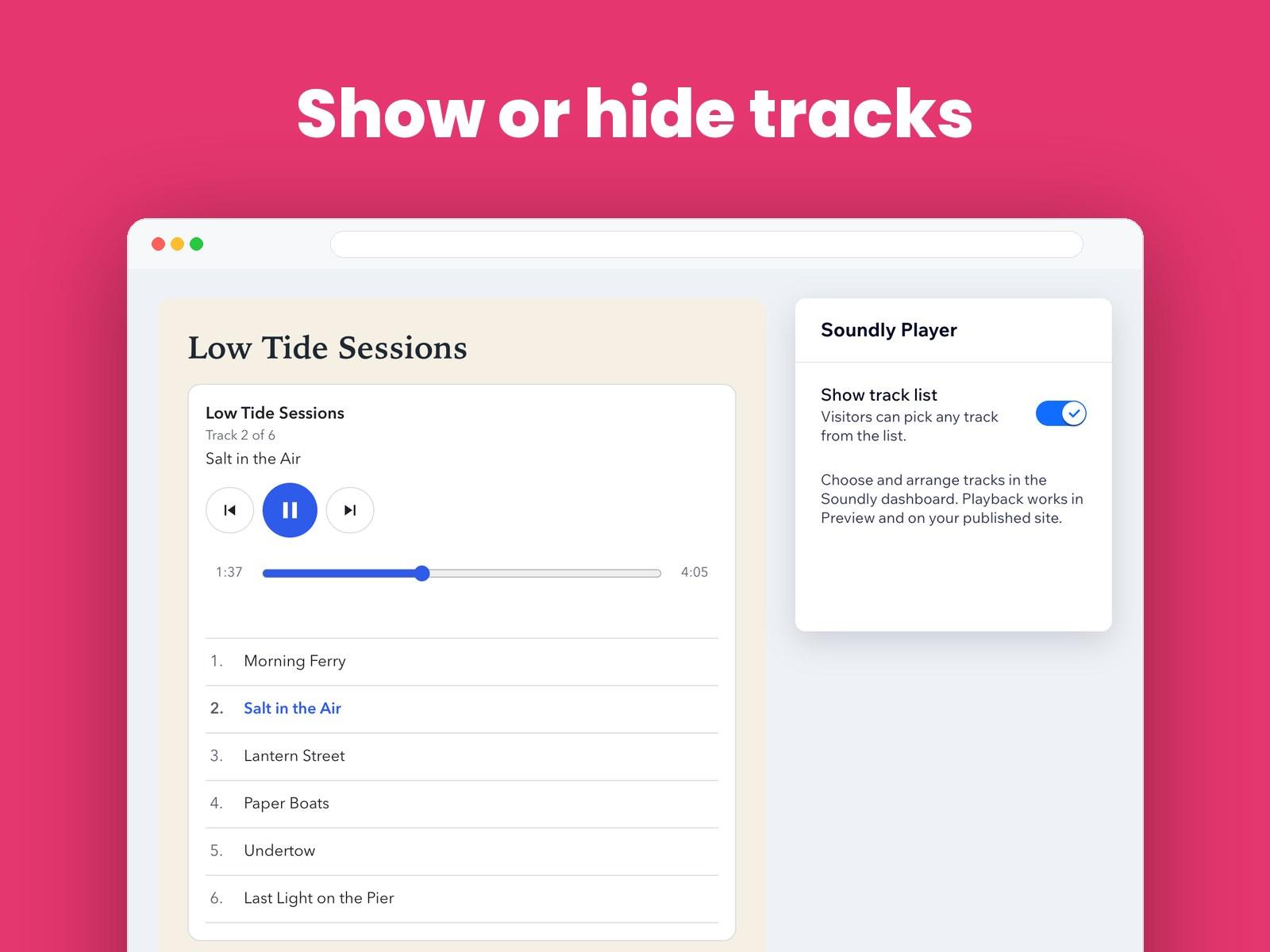
Play and pause, previous and next, a seek slider and a track list you can show or hide in the Editor.
Every control is labelled for screen readers and works from the keyboard. Add an optional transcript link to any track.
Sound starts only when a visitor presses play, and only one player plays at a time on a page.
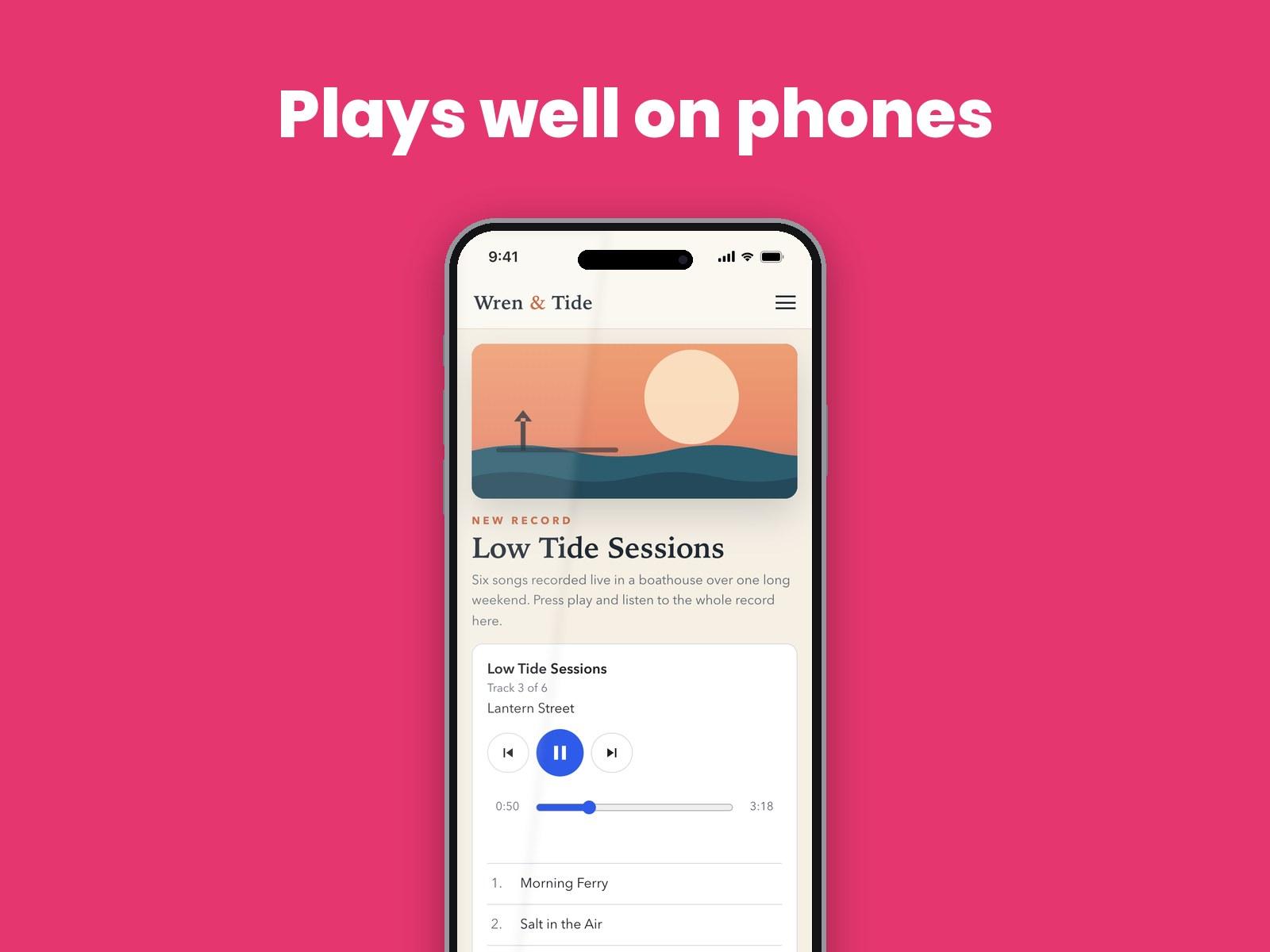
Large touch controls on phones, and the player respects the reduced motion setting on visitors’ devices.
If a file can’t play, visitors see a plain message with Try again and Next track instead of a silent player.
Customer-free demonstration data shows the product states without exposing merchant or shopper information.
Configure it inside Wix, preview the experience, and publish when it looks right.
Add Soundly to WixInstall Soundly from the Wix App Market. The player is added to your site.
Open Soundly in your site dashboard, add audio files from your Media Manager, name and order the tracks, and save.
In the Editor, choose whether to show the track list, then publish your site and test the player with a keyboard and on a phone.
Yes. The Free plan includes up to 3 tracks. Pro is $5.99/month, or $4.97/month billed yearly, and includes up to 50 tracks.
Whatever the visitor’s browser can play with its built-in audio support. MP3 works everywhere, so it’s the safest choice.
In your site’s Media Manager. Soundly saves only your playlist: its title, the track titles and order, links to the files and any transcript links. It never hosts audio.
No. Soundly never autoplays. Sound starts only when a visitor presses play, and only one player plays at a time on a page.
Your site keeps playing the tracks you already saved, but you can’t add new ones.
Soundly has one playlist per site and plays files from your Media Manager only, not links to audio elsewhere. It has no style or color controls, stats, RSS feeds, text-to-speech, private or DRM-protected audio, or waveforms.
Jump directly to this app's legal information or support channel.
Soundly stores one playlist in an app-owned Wix Data collection on the site. Your audio files stay in your site’s Media Manager, and Soundly collects no visitor data.
This notice describes the data practices of the Audio Player | Soundly app for Wix. MarketForge is the app provider and is responsible for the app data it controls. Wix, the Wix site owner, and the service providers listed below may separately control or process information under their own terms and privacy notices.
This notice covers the app itself. Visiting MarketForge.tech is also subject to the MarketForge website privacy policy. Use of the app is governed by its app-specific Terms and Conditions, which supplement our general Terms of Service.
Information supplied by or associated with the Wix site owner who installs and configures the app.
The Wix app-instance ID from Wix’s verified request context authorizes dashboard actions and looks up the site’s plan. Soundly does not store the owner’s name, email address or business details.
One playlist row: the playlist title, the track titles and their order, links to the audio files in your Media Manager and any transcript links you add.
Soundly reads the site’s plan from Wix to apply the Free or Pro track limit. Technical error messages may be written to Wix’s app hosting logs when a request fails.
Information processed when the app appears on, or is used from, a merchant's live Wix site.
The player reads the saved playlist and the visitor’s browser plays the files from your Media Manager. Soundly collects no visitor data and adds no analytics or tracking.
Configure and operate the feature requested by the merchant, maintain authorized app access, and deliver support. This is necessary to perform our agreement with the merchant.
Diagnose errors, protect the service, prevent abuse, and preserve reliability. We rely on our legitimate interest in operating a safe, dependable product.
Understand onboarding and app-level outcomes where the app-specific disclosures above describe analytics. We limit this to what is reasonably needed for product improvement.
Respond to valid legal requests, enforce our terms, and keep records when applicable law requires it.
The Wix site owner is responsible for choosing an appropriate legal basis, displaying required notices, and collecting any consent required for the app's use on their site. MarketForge does not use app visitor data for unrelated advertising or sell personal information.
The app shares or makes information available only as needed to provide the functions described here, comply with law, or protect the service.
App hosting and authentication, app-owned Wix Data storage, the Media Manager files the player plays, plan status and error logs.
Providers may process information in countries other than the visitor's or merchant's home country. Their privacy notices describe the safeguards and rights that apply to information they control.
We use reasonable administrative and technical safeguards, including platform access controls and encrypted transport where supported. No internet or storage system is completely secure. Where an app uses settings in a Wix live-site embed, those settings are visible to the public widget and must not contain secrets.
Depending on location, an individual may have rights to access, correct, delete, restrict, object to, or receive a copy of personal information, and to withdraw consent without affecting earlier lawful processing. We may need to verify the requester and the relevant Wix site before acting. A complaint may also be made to the appropriate data-protection authority.
We will update the date above when this notice changes. If a change materially affects app data practices, we will provide notice through an appropriate channel, such as the app dashboard, Wix listing, or email when available. The app is intended for business websites and is not directed to children under 16.
Ask a privacy question or submit a verified data request. Please include the app name and the Wix site or account needed to locate the relevant records; do not email passwords or payment information.
support@marketforge.techThese app-specific terms govern use of Audio Player | Soundly and supplement MarketForge's general Terms of Service. If the two conflict about this app, these app-specific terms control to the extent of that conflict.
Audio Player | Soundlyis a business tool for Wix websites. You must control or be authorized to manage the Wix site where it is installed and must use the app in compliance with applicable law, Wix's terms, and these terms.
The current product scope is the scope described on this page. Features that are labelled beta, pre-release, planned, configured, or subject to verification are not promised as generally available.
Wix is a separate platform provider. Wix controls Wix accounts, hosting, the App Market, platform APIs, site plans, and platform availability under its own terms. MarketForge provides and supports Audio Player | Soundly; Wix does not provide MarketForge support.
The app may depend on Wix products or the third-party services identified in the Audio Player | Soundly Privacy Policy. Changes, outages, restrictions, or discontinued functions in those services can affect the app. MarketForge does not control those services.
Current plan options, prices, billing periods, trials, and promotions are the options shown in Wix when you install or manage the app. If you choose a paid plan, Wix or the Wix App Market processes the transaction and applies the billing terms shown at checkout.
Manage plan changes or cancellation through Wix. Refunds and credits are subject to the Wix or App Market process and applicable law. Contact MarketForge if app-specific information is needed to review a request; nothing here limits non-waivable consumer rights.
MarketForge uses reasonable care to operate the app, but does not promise uninterrupted, error-free, instantaneous, or permanently available service. Results can depend on Wix, third-party providers, site configuration, data supplied to the app, browser behavior, and network conditions.
To the extent permitted by law, the app is provided as available without a guarantee of revenue, conversion, search ranking, traffic, delivery timing, customer response, or any other specific business outcome.
We may update the app or these terms to improve the service, address security or legal needs, or respond to platform changes. We will update the date above and use an appropriate notice channel for a material change when reasonably available.
You can stop using the app and uninstall it through Wix. MarketForge may restrict or suspend access for abuse, security risk, non-payment of an applicable plan, legal requirements, or a material breach of these terms. Sections that by their nature should continue after use ends—including payment obligations already incurred, ownership, disclaimers, and legal limits—continue to apply.
Contact MarketForge with the app name, the relevant Wix site, and a clear description of the issue. Do not send passwords, full payment-card details, or unnecessary visitor information.
Install from the Wix App Market and configure the first version on your own site.
Add Soundly to Wix